Wednesday, March 28, 2012

GH: POINT ATTRACT / REPEL

Creative Commons License
This work is licensed under a Creative Commons Attribution 4.0 International License.
GRASSHOPPER POINT ATTRACT / REPEL


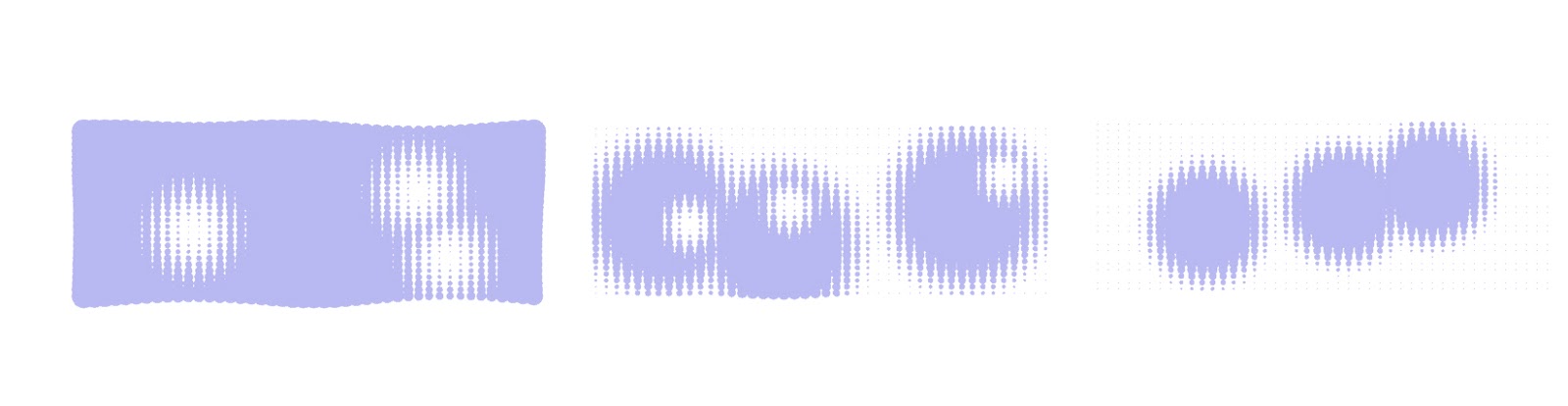
This definition gives attraction or repulsion forces to points and can switch between the two

LOGIC
1. Measure the distance between source points and attraction / repulsion points
2. Manipulate the strength and coverage area of the forces
3. Create a switch to choose between attraction or repulsion forces
4. Use the data to control some variable (scale, height, movement, rotation, ect)  

GH Version
0.8.0066

Tip
Attraction and repulsion based on distance are a major concept of associative modeling.
Variations in the "strength & coverage" mathematics such as adding sin functions, 
multiplications, or other functions can make the attractor / repeller have new and interesting results.
Do not forget, the results of attractors / repellers can be used to control virtually anything, here we 
control radius of a circle, try it for many things. 


Creative Commons License
This work is licensed under a Creative Commons Attribution 4.0 International License.
Tuesday, March 27, 2012

GH: SINE TOWER

Creative Commons License
This work is licensed under a Creative Commons Attribution 4.0 International License.
GRASSHOPPER SINE TOWER

 
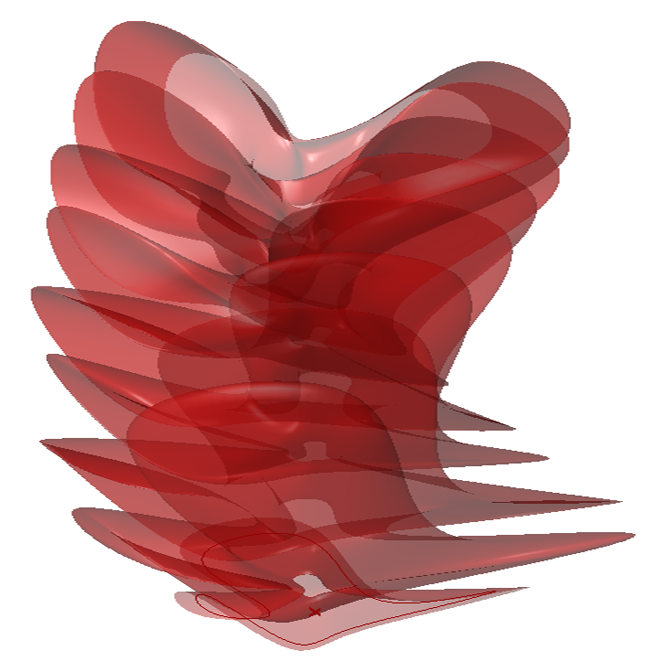
This definition takes a closed curve and creates a single surface tower via sine scaling

LOGIC
1. Create a closed curve
2. Copy the curve along the divisions of a line
3. Rotate and scale the copied curves with interval and sine functions
4. Loft the curves to make one surface 


GH Version
0.8.0066

Tip
For more interesting results make a closed reference curve 
that is manipulated in both the x,y,and z direction. Also, replace 
the sine component with a cosine component to reverse the effects. 
Since the result is one surface, try adding box morph techniques
for more intricate surface designs.      


Creative Commons License
This work is licensed under a Creative Commons Attribution 4.0 International License.

Sunday, March 25, 2012

GH: BOX MORPH

Creative Commons License
This work is licensed under a Creative Commons Attribution 4.0 International License.
GRASSHOPPER BOX MORPH

 
This definition morphs geometry into surface boxes

LOGIC
1. Create a surface
2. Divide the surface into boxes
3. Create an object to panelize
4. Morph the object into the boxes along the surface 


GH Version
0.8.0066

Tip
To add multiple objects per box, right click the brep component (brep to panelize) 
and select set multiple breps.Then right click U input of bounding box component (boundary) 
and set boolean to true. Finally, right click the box morph component (morph) and set to cross reference.     


Creative Commons License
This work is licensed under a Creative Commons Attribution 4.0 International License.

GH: SURFACE BLEND

Creative Commons License
This work is licensed under a Creative Commons Attribution 4.0 International License.
GRASSHOPPER SURFACE BLEND

 
This definition creates a surface by blending between two surfaces.

LOGIC
1. Create two surfaces to blend between
2. Divide both surfaces with points
3. Connect the points between surfaces with lines
4. Slide points along the lines
5. Create new points with curves
6. Loft curves to build the blended surface

GH Version
0.9.0065


Tip
Typically it is best to create one start surface, then copy it, and move / manipulate the copy to use
as the other start surface. This ensures the surfaces have corresponding UV coordinates. If any twisting
or crossing occurs with the lines between the surfaces try rebuilding one of the surfaces  to match UV
or try components like flip matrix and flip surface.    


Creative Commons License
This work is licensed under a Creative Commons Attribution 4.0 International License.

GH: SPIRAL MIRROR

Creative Commons License
This work is licensed under a Creative Commons Attribution 4.0 International License.
GRASSHOPPER SPIRAL MIRROR

This definition creates a doubly periodic surface by mirroring a trimmed spiral.

LOGIC
1. Create a spiral surface
2. Double the spiral surface back to back
3. Trim the spiral edges with a square
4. Mirror the trimmed spiral surface to generate a symmetric form 


GH Version
0.8.0066

Tip
Forms like this love mirroring, add more mirror sequences to grow larger systems
and also try box morphing this form onto surfaces and into custom twisted boxes.  


Creative Commons License
This work is licensed under a Creative Commons Attribution 4.0 International License.

Friday, March 23, 2012

GH: VORONOI SKELETON

Creative Commons License
This work is licensed under a Creative Commons Attribution 4.0 International License.
GRASSHOPPER VORONOI SKELETON

 
This definition creates a smooth mesh skeleton of a 3D Voronoi.

LOGIC
1. Create 3D Voronoi
2. Remove exterior faces
3. Move Voronoi cells away from each other
4. Loft together common faces
5. Create mesh and smooth connections

GH Version
0.8.0066
Plug-ins Required
1. Weaver Bird
2. Mesh Analysis and Utility


Tip
In the section "move voronoi cells away from each other" try replacing the volume component
inputted into B of Vec2Pt with a referenced point from rhino for different overall skeleton shapes.   


Creative Commons License
This work is licensed under a Creative Commons Attribution 4.0 International License.